Saturday, December 27, 2014

Drone Following Project #15: ROS development

I uploaded an early, early version of the ROS package that listens to the device and sends the info to the Drone. You'll notice that the first executable is called 'button_launch'. That's because the first part I want to work with is sending the Drone to TakeOff mode and Landing mode simply from pressing the Arduino button. The full executable will likely look similar though, as this functionality is also included in the full scope of the project. As you can see the use of the new bool message ('/Lakitu/Device/NewState') has helped organize things greatly. I still feel that I can cut down the amount of times State is subscribed to with some clever implementation, but I'm a bit tired for it now. My pseudocode stab is:

...
NCallback(Bool msg){
 ...
 ...
 ...
  r_nustate=msg->data;
}

SCallback(UInt8 msg){
  r_state=msg->data;
}

Subscribe('NewState',1000, NCallback);
if (r_nustate ==true){
   Subscribe('State',1000, SCallback);


switch(r_state):
...


This way we only call on that extra subscriber when we need it, and rely on global memory otherwise. I have kind of PTSD from being really careful about the memory from working the Velodyne HDL-32E, since I was having to transfer a lot of pics and clouds at the same time.

 Once this is all hashed out, I'll begin testing using the special String publisher I made, then maybe the Drone's LEDs, and then finally the Drone actually taking off and landing. You can never be too careful when playing with the Drone indoors, or for an extended amount of time. Then it's on to the glorious world of IMUs.


On the topic of Velodyne, I'll be making my Velodyne code available on Github slowly. It will be a private repo, and it may take a while because I want to document it really well. I'll make an update when it becomes available.

Friday, December 26, 2014

Drone Following Project #14: Updated Arduino sketch

I'm feeling better, so I went ahead and fulfilled all of my improvements for modifying the Arduino sketch, along with some new features. Here's a quick overview of the new features:
  • Two publishers (Uint8 for state, and Bool for new state)
  • Consistent "/Lakitu/Device" name scheme
  • 3 LEDs (blue, yellow, green)
  • 4 states (Landing, DronePosition, Takeoff, Calibration)
The two publishers were already explained, but why did I add a whole new state? Well, again, I was thinking ahead at the steps that need to be taken when GPS is implemented. We've taken it for granted so far that the Drone is going to translate its position from the device, however, I failed to addressed how the Drone would receive its initial distance from where the device will be. There are a few sensing and distance ways to go about this, but I worry that many of them limit the set of scenarios greatly. I currently have it in mind that you will be able to press a button to generate a GPS location for the Drone that will change as the Drone moves. Whether this method is successful or not, I feel that it's good to secure a state where the user can can safely move around and find the initial distance from the drone without the danger of it moving.

Anyways, you can can see the changes made on Github. Enjoy!

Wednesday, December 24, 2014

Fooling around with RetroPie #1: Setup and Performance

I haven't abandoned work on my Drone project, but at the same time, I've been really sick... I came down with the flu two days, and have been practically immobile since. Today I've managed to do a bit more moving around, so I finally got around to playing with the Raspberry Pi my girlfriend bought me for Christmas. It came with one memory card with NOOBS pre-loaded onto it, but for the purposes of playing with emulation. After I spent this morning constructing a pi-box to house my Raspberry Pi in, I began with Lifehacker's great tutorial on setting up Retropie for the Raspberry Pi. I found it pretty easy to follow, but there was a few things I wanted to note for anyone else pursuing emulation on the Raspberry Pi (or any other hardware for that matter):


  • There's a million ways to do anything, especially when you're working this deeply with a computer system. This tutorial 

  • Emulation is a precise art. As much as we all enjoy running games on our computers, there's so much going on that you'll find it varies drastically from machine to machine. Even in the case of two Pi's, you'll see different people having different issues. All sorts of changes can made, some of which you may not have even thought of, that may help performance on any given emulator.

    Sadly, this is not only the case with emulators, but specific ROMs as well. There are a few games, even generations old, that emulation has yet to figure out, such as Pokemon Snap. 

Thankfully, the ceiling is always expanding, and what wasn't possible on high-end hardware years ago is possible on mid-range and low-end hardware today. Thankfully, if you can put frustration aside you'll find that the reward of a small, customizable 35$ all-purpose emulation machine that only requires a TV (of any kind!) and a USB controller (of any kind!) is worth the wait. 

My Experience

So after getting my micro-SD properly imaged, I booted into RetroPie and did some configuring.

However, I was in a precarious position... I'm in the basement of the home under quarantine with the flu, far from ideal when you need a wired connection. After a little research I found that there is another-- debatably more convenient option-- that uses only a USB stick. That's right! All you need to do is stick a USB drive in your Raspberry Pi with everything configured, and it'll automatically create a directory of ROMs (appropriately called 'roms') which you can place ROMs in from your computer and then migrate to your Pi without the hassle of dealing with Cyberduck or any other ftp/ssh clients.

After I made a decent selection of ROMs playable, here were some of the performance issues I noticed:

  • NES: Initially so slow it was unplayable. Nearly half-speed across all titles. Strangely though, I came back later to find most titles between 90% and full-speed.
  • SNES: Great! No complaints out of the box. The sound effects seem slightly louder than the original hardware, but that could be due to the television. 
  • N64: Wouldn't even boot, ha. Checked out the logs, and it never clearly displays an error-- just says stopping emulation. This seems to be the great enigma of Raspberry Pi emulation at this point in time.
  • PS1: Worked surprisingly well, though all I played on it was famously 2D game with little fanfare. 
  • GBA: Required a bios, which I didn't feel like importing at the moment. More on that at a later date.

What's Next

So this is all pretty cool, but how can we make it more interesting?  Well, there's a few fields that can be pursued from this point.  Here are just a few ideas:

  • External Modification:The Raspberry Pi has all of the electrical potential (no pun intended) of the Arduino, and can have buttons and switches all with their own purpose.What's a console without a reset or power button? And that's just a starting point.
  • Internal Modification: Besides just contributing to the altruistic cause of getting the emulators to run better, there's also a lot of customization to be had within the EmulationStation suite itself. Right now it looks great in HD, but I'd like to customize to my liking-- more sounds, descriptions and nostalgia would be great.
  • A prepared package: Putting these two things together I'd like to make some cool custom consoles-- on a budget. Imagine a dedicated console to your favorite franchise like Mario or Zelda, featuring all of the games, a relevant gui, and an appropriate soundtrack-- and maybe even other features, like Ebooks, images, and the like. 

My Project

I'm wanting to do just that eventually for the famous fighting crossover Super Smash Bros. Imagine cycling through the abundant character roster, panorama style, and picking a character, only to be treated to their entire history of memorable games. Of course this would be a huge challenge, not only on the graphical end, but also in getting all of the emulators to function reasonably. I think that first I would try to do the same thing for the beloved Mother franchise, with a few extra touches. Since the Mother series is only limited to a few select titles, this would be a much easier task to accomplish. There are plenty of existing assets to work with, both original and fan-made, and the fact that they only span three 2D consoles, allows for work on some extra features, like maybe the addition of NES and SNES controller ports. 

But that's thinking super far ahead, at least for the time being. For now I intend to just enjoy my awesome emulation machine and catch up on some classics. Feel free to leave comments with any suggestions. 

Monday, December 22, 2014

Drone Following Project #13: State of Grace

Work on the "Lakitu" ROS package has began! I'm trying my best to make headway, but unfortunately, I'm also ill at the moment. Currently I'm working on making the Arduino state machine launch the Drone via rosserial. In order to do that though, I'm slowly realizing I could modify my Arduino sketch in a slight manner in order to greatly increase the efficiency of how the two objects communicate. For the time being, the Arduino is constantly broadcasting it's state, and the program is constantly receiving it. As I was implementing this, I realized that this is quite inefficient, if you consider what all is going on in this manner:
  • /Lakitu/Device_State is constantly sending out messages regarding states.
  • The ROS package is constantly receiving these messages.
  • The ROS package is constantly evaluating what to do with these messages.
  •  The ROS package is constantly sending out messages to drone topics such as "/ardrone/takeoff" and "/ardrone/land"
The problem is that we always want the drone to be aware of what it should be doing, but not be bogged down with too much information. Therefore I propose we take a step back and modify the Arduino sketch to now send out two messages, the original and a new boolean message that signifies if this is the first change to a new state. This adds only a slight amount of added stress on the Arduino in order to take a large amount off of the ROS node-- which quickly becomes bungled as the 'communicator' for all aspects of the program. This will reduce our complicated web of 'if' statements constructed from handling the state machine to a much simpler series that will only ever be evaluated if it is the first spin of a new state.

After this has been handled, I'll be working with first just getting some strings on the ROS terminal to match these states, then the Drone's LEDs, and then, finally takeoff and landing (if I can find the space to safely do so). From this point I'll be moving on to handling the IMU's data and orientation, and then GPS.

-----------------------------------------------------------------------------------------------------------------------------------

Additionally, I'll be working on making things more uniform. The device will follow the topic convention of

/Lakitu/Device/<topic>

And things on the ROS end will be 

/Lakitu/<topic>
 

Tuesday, December 16, 2014

Drone Following Project #12: ROS and ardrone_tutorials

Today, during my lunch break I connected my Drone to ROS and gave it a whirl. This made signficantly easier by MikeHamer's ardrone_tutorials repo. In fact, I'd say that this is a great fit for any hobbyist, besides the fact that you have to set up and configure ROS in Linux (though I heard thay make preset virtual machines for this).

Whereas I'm using to breaking my neck attempting to connect to the Velodyne or other ethernet based utilities, connecting to the Drone was a synch. Perhaps this is due to the fact that it has own wi-fi connection, and you don't have to fool with all of that other garbage. Anyways, I managed to quickly get outdoor_controls.launch working. It pops up a handy camera feed GUI, and from this point you can use WASD style controls to steer the drone in all directions. More importantly, we can use rostopic to navigate the many, many topics that the ardrone_driver node produces... Thankfully, it is fairly well organized. There is a direct nav topic, IMU topic, a set for each camera, and even one for an emergency reset. I suggest you peruse ardrone_autonomy's readme for more info-- it is really well written. Below you can see some of my screenshots from my flights, along with the data produced.


Sorry for no IRL pictures of the drone in action. I'm sure we'll get enough of that later. Now on to deciphering those topics, and learning to put them in code!

Monday, December 15, 2014

Drone Following Project #11: Project Name!

This is a stupid and insignificant detail, but I've finally realized what to call this project! I originally had it under a Repo known as "AirCat", an obvious play on "AirDog", but I've found something much better.

Do you remember Super Mario 64?

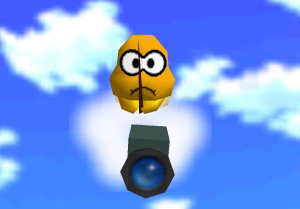
Even if you don't, perhaps you recognize this character:


This is Lakitu. He got his start throwing spined turtles ("Spinies") at Mario in the original Super Mario Bros., but as time went on Nintendo chose to give him a more friendly role in future titles, such as an assistant in Paper Mario, the flagger in Mario Kart, and most importantly, the cameraman in Super Mario 64.
His significance as the cameraman was a pretty unique one at the time. While there may be an existing exception, not many thought to actually characterize the camera in a video game before, and most treated it as simply a mechanic. In Super Mario 64, Lakitu is actually the first character shown in the game world, flying down as Mario heads to the castle, and taking the place as his cameraman. From this point on, the player controls not only Mario in saving Princess Peach, but as Lakitu as well, helping properly angle the camera so that the player can more easily see what is around them. Today, I had the realization that this is not unlike the intended result of this project. Therefore I choose to name the project Lakitu. 
If I complete it in a timely manner, I'll be sure to make my own Super Mario 64 video as a demonstration. Hopefully I can attract the gaming community to this project and get the word out. It's good to balance yourself as engineer by surrounding yourself with clever and imaginative people. It could mean inspiration for your next part of the project! I foresee the implementation of Oculus Rift being a popular topic of discussion.


Bonus asset:


Sunday, December 14, 2014

Drone Following #10: Added ROS capabilities to sketch

Tonight I added ROS functionality to Arduino sketch. It's just a few lines of code, but they have great implications! The LED state machine is now a Publisher and sends its information via the serial port, so now anything connected to ROS on my laptop can read what state the device is in. Logically, the next step is to start working with the Drone. Here are some screenshots from it in action:


As you can see, rosserial got a little upset at my procedure... and I'm not sure why. All 3 states still work in action, but I get lots of mean text as opposed to the approval you get from other message types. A lot of threads seem to indicate this is due to the relative message size and buffer size for the particular board, but I seem to be well within the limits of my ATMEGA32 board. I'm investigating it currently, but as it works, I'll also be moving on to something a lot more exciting.